Now on the App Store · iPhone & iPad

Know what you are ordering.

MenuTure helps diners scan unfamiliar menus, find the dish names that matter, preview what those dishes look like, and hear pronunciation before ordering.

Scan Capture printed or digital restaurant menus.
Extract Turn menu text into a clean dish list.
Preview See images and hear names before choosing.
MenuTure

Know what you are ordering.

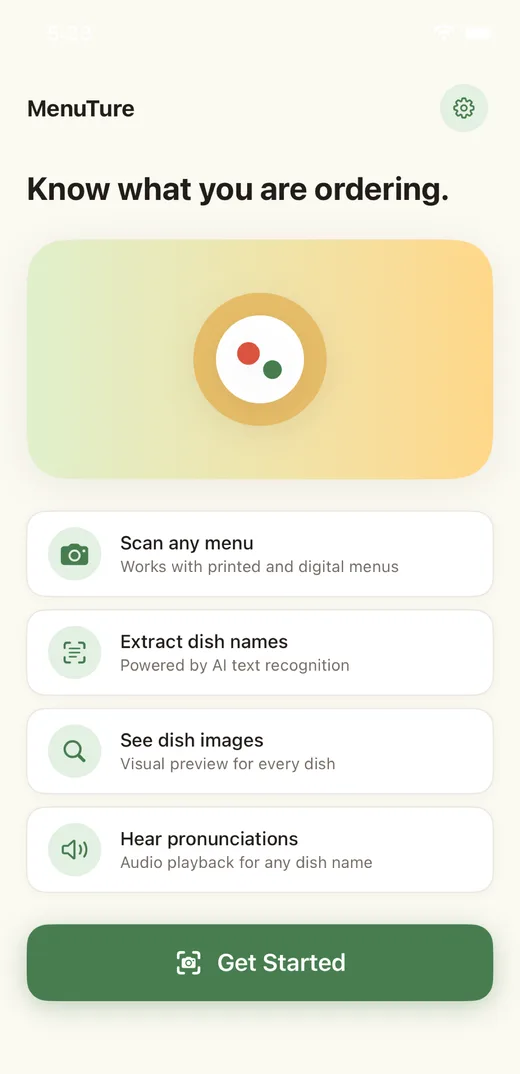
Scan a menu and turn dish names into photos and simple explanations.

Scan any menuWorks with printed and digital menus
Extract dish namesPowered by AI text recognition
See dish imagesVisual preview for every dish
Live walkthrough

From menu photo to clearer choice.

Watch the real in-app flow: capture a menu, let on-device text recognition and AI find the dishes, then explore each one with photos and pronunciation.

Capture Menu
Position your camera to capture the entire menu Good lighting helps improve recognition.
Preview
Extracting text… Identifying dish names…
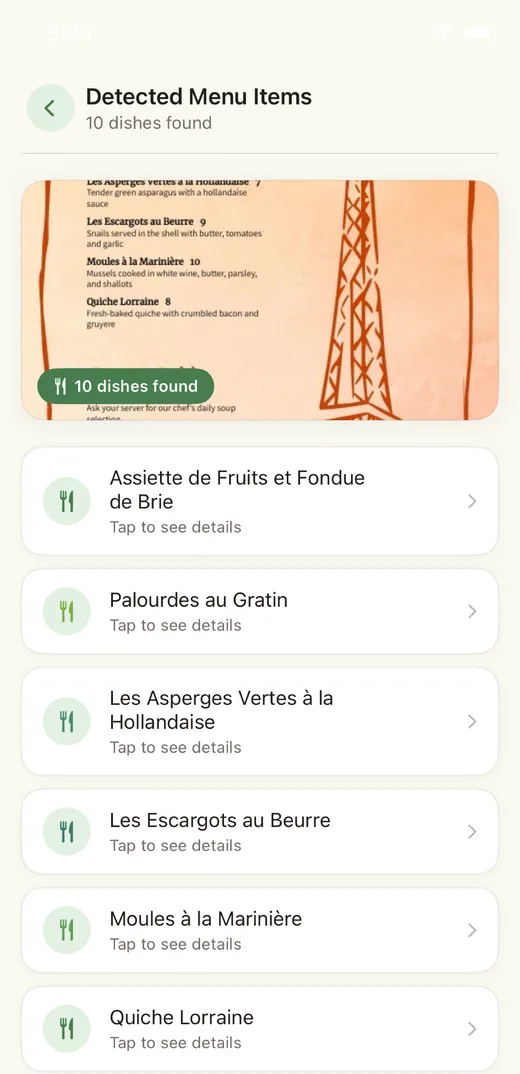
Detected Menu Items
10 dishes found
Assiette de Fruits et Fondue de BrieTap to see details
Palourdes au GratinTap to see details
Les Escargots au BeurreTap to see details
Moules à la MarinièreTap to see details
Quiche LorraineTap to see details
Quiche Lorraine
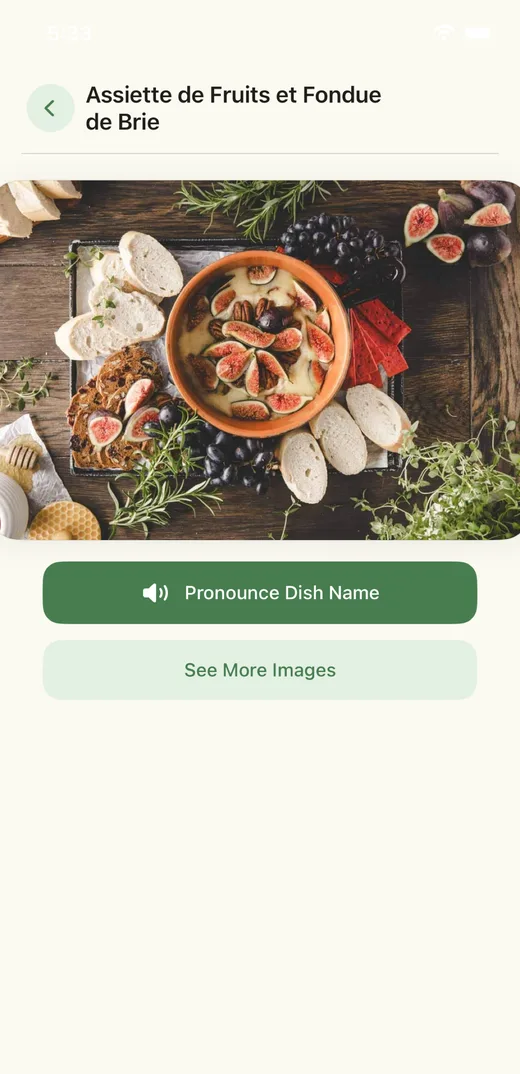
Pronounce Dish Name
See More Images
1

Capture the menu

Use the camera or photo library to snap a menu with clear lighting. A preview screen lets you retake before analyzing.

2

Read & identify

Apple Vision reads the text right on your device, then AI filters it into dish names — ignoring prices and descriptions.

3

Browse detected dishes

A dense menu becomes a clean, tappable list of dishes with a count badge — even for menus in other languages.

4

Preview & pronounce

Each dish page shows real photos, plays the pronunciation aloud, and links to more images — all without leaving the table.

Auto-playing demo · click any step to jump.

Mission

Make unfamiliar menus feel less uncertain.

Eating out should feel curious, not confusing. MenuTure is built for the moment when a dish name sounds interesting, but you do not know what will arrive at the table. The app gives just enough visual and pronunciation support to help people order with more confidence.

Story

Built from a small dining problem.

The idea started with a simple restaurant habit: searching dish names before ordering. MenuTure turns that habit into a focused flow. Take a photo, let the app identify likely dish names, then explore each one without leaving the dining moment.
Features

Everything you need at the table.

A focused toolset for one moment: deciding what to order. No accounts, no feeds — just fast menu understanding.

Scan any menu

Point your camera at a printed menu, a chalkboard, or a screen. A guided capture screen helps you frame the whole menu.

AI dish extraction

AI reads the raw menu text and returns only the dish names — prices, descriptions, and section headers are filtered out.

Real dish photos

Every detected dish gets a live web image lookup, so you can see what is likely to arrive before you commit to it.

Hear pronunciations

Tap once and the app speaks the dish name aloud with text-to-speech — order “Moules à la Marinière” with confidence.

Multi-language interface

Switch the app interface language in Settings — built for travelers who run into menus far from home.

Private by design

Menu text is read on your device with Apple Vision. Only the extracted text is used to identify dishes — no account needed.

App experience

A clean flow for the table.

The interface uses a soft green and warm yellow palette, white cards, quiet borders, and readable screens designed for quick restaurant use.

MenuTure home screen
Home
MenuTure detected menu items screen
Detected dishes
MenuTure dish detail screen
Dish detail
MenuTure Cursor Spark brand icon
Technology

Native iOS, with AI where it counts.

MenuTure is a fully native SwiftUI app. Text recognition runs on-device with Apple Vision, a language model turns raw menu text into dish names, and live image search plus speech synthesis make each dish easy to understand.

SwiftUINative iPhone & iPad app
Apple Vision OCROn-device text recognition
AI extractionLLM-powered dish identification
Image searchLive photos for every dish
Speech synthesisSpoken dish pronunciations
LocalizationMulti-language interface
FAQ

Common questions.

A few quick answers about how MenuTure works and what it needs.

MenuTure works best on printed and digital menus. Clear, well-lit photos give the strongest results. Menus in other languages are supported — dish names are kept in their original language so you can point to them, see photos, and hear how to say them.

No account is required. Text recognition runs on your device; a connection is needed for dish identification, photo lookup, and the latest images. Pronunciation uses the built-in iOS voice and works offline.

Photos are processed for text on your device with Apple Vision. Only the extracted menu text is sent for dish identification — the photo itself stays with you.

MenuTure is available on the App Store for iPhone and iPad. The interface language can be changed in Settings inside the app.

MenuTure is now available on the App Store.

Download MenuTure to scan menus, understand unfamiliar dish names, preview dishes, and hear pronunciations before ordering.

Download Now